

AdSecure now integrates directly with white-label ad serving platform EXADS (opens in a new tab), giving ad networks running on the EXADS platform a fully automated pipeline from violation detection to enforcement action — without any manual intervention.
What the integration does
Ad networks using EXADS can now connect their AdSecure account directly to their EXADS admin panel. Once connected, AdSecure continuously crawls advertiser campaigns — creatives, landing pages, and redirect chains — across a wide range of devices and GEOs, flagging violations in real time.
When a violation is detected, EXADS receives the scan result and automatically triggers whatever action the network has configured for that violation type: pausing a campaign, disabling risky creative formats, unverifying an advertiser, archiving an account, or simply sending an alert to the team.
The result is a closed loop: AdSecure detects, EXADS acts.
Why Ad Networks need AdSecure’s integration
Ad networks and Publishers have a recurring problem: the volume of new creatives, landing pages and redirect chains grows much faster than it is possible to stay on top of them. Trying to manually check every new campaign across a busy network ends up either missing violations or slowing the publisher experience to a crawl.
A few situations this integration is built for:
- You want to catch malvertising before your publishers do. Map violations like Malware, Phishing URL and Cryptocurrency Miner to Pause Campaign. The moment AdSecure detects one of these, the campaign stops serving, before a publisher’s audience is exposed.
- You want broken landing pages caught automatically. Map Landing Page Error to Pause Campaign and any campaign with a broken link is pulled from rotation until the advertiser fixes it.
The point isn’t that AdSecure replaces human review. It’s that the repetitive decisions get made automatically, so your team only has to look at the cases that actually need human judgement.
How the AdSecure EXADS integration works
The integration has two halves: a scanner side (AdSecure) and an action side (EXADS).
AdSecure scans creatives, landing pages, redirects and the full ad supply chain on a schedule you control, looking for violations.
EXADS receives those scan results and matches each violation against the rules you’ve configured. If a rule matches,
EXADS triggers the action you’ve mapped to it, automatically, in real time.
The mapping between the two is done through Rules, which sit at the heart of the integration.
The Rules engine
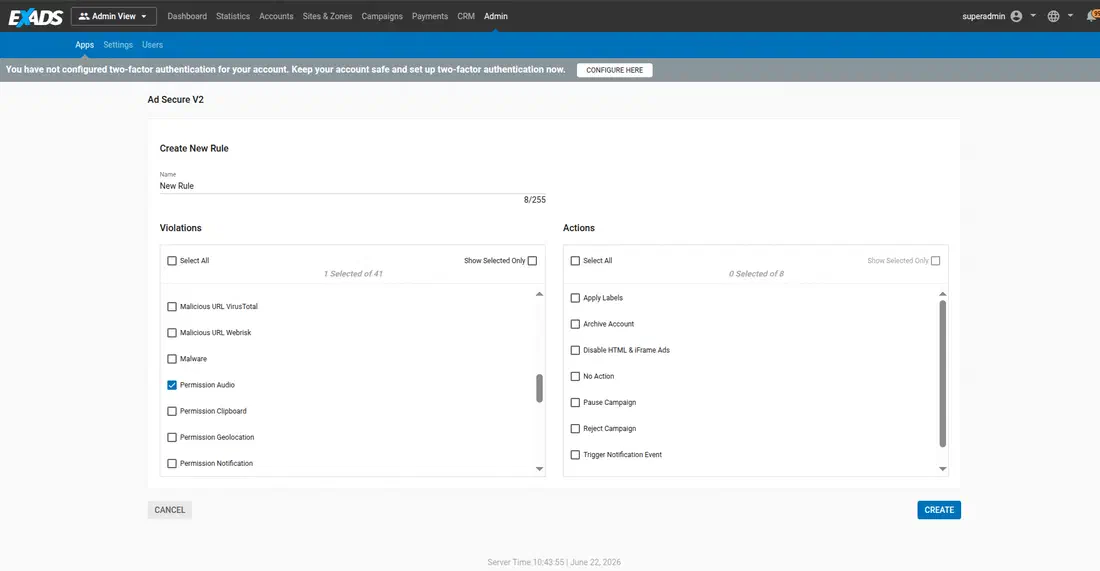
Each rule is a simple mapping: when AdSecure detects these violations, take these actions in EXADS. You can have as many rules as you need. Each rule supports:
- Multiple violations: pick one or many from the list of AdSecure detection types. The same violation can appear in more than one rule, as long as the violation + action combination is unique.
- Multiple actions: apply more than one action per rule (for example, pause the campaign and send a notification).
The Rules table in the AdSecure section of the EXADS Admin panel shows every rule at a glance, with edit and delete icons for quick management.
Available actions
Depending on how a rule is configured, you can choose from a range of automated actions, including:
- Pause Campaign — stop the campaign from serving immediately
- Disable HTML & iFrame Ads — disable the riskier creative formats on a flagged campaign
- Unverify Advertiser — flag the advertiser account for re-verification
- Archive Account — archive the advertiser account entirely
- Trigger Notification — alert your team without taking any other action
- No Action — log the violation but do nothing (useful for monitoring before you commit to an automated response)\
What gets scanned?
The integration covers the main creative formats and destinations your advertisers submit through your ad server, including banner, video, HTML, iframe and link variations — with each one automatically submitted to AdSecure for analysis based on the rules you’ve configured.
Notifications
When AdSecure detects a violation and a rule matches, EXADS fires off an AdSecure Violation notification. This reaches the right people via:
- Email to Network Admins
- Optional email to the affected Advertiser, if you want them looped in
- An entry in the Notifications Panel for both Admin and Advertiser accounts
Where to find it in the EXADS Admin Panel\
The integration lives in Admin > Apps > AdSecure. From there you can:
- Toggle the integration on or off
- Enter your API Key to authorise communication with AdSecure
- Set the Initial Frequency — how often new campaigns are scanned after creation
- Set the Maximum Frequency — the ceiling for ongoing scans on existing campaigns
- Add, edit or delete Rules\
Who can use it
The AdSecure integration is configured by users with EXADS Network Admin access. Notifications about detected violations are sent to your EXADS Network Admins automatically, and optionally to the affected Advertiser account.\
A note on prerequisites
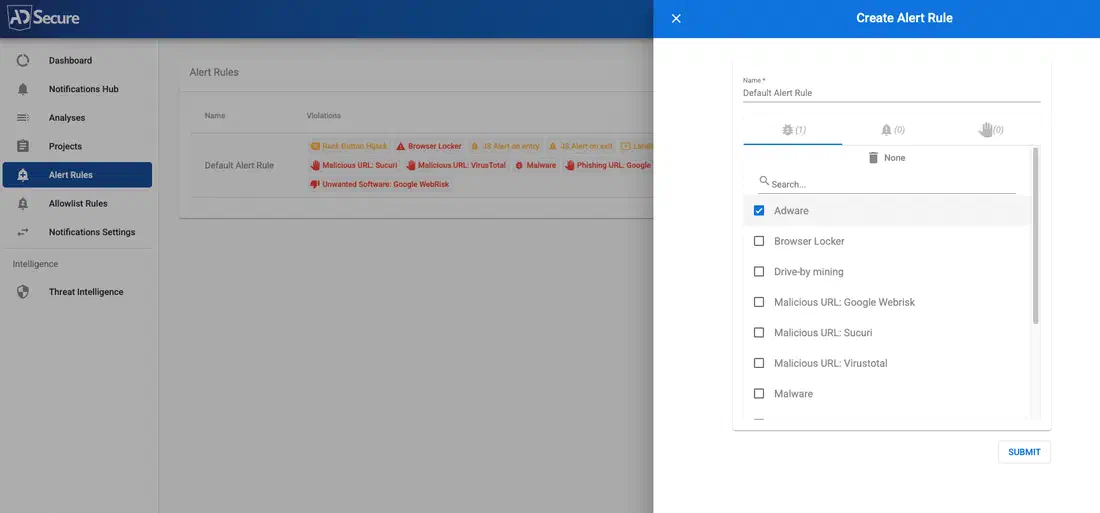
For the integration to work, two things must also be configured on the AdSecure side of the setup, with specific names that EXADS expects: a Default Alert Rule (which tells AdSecure which violations to scan for) and a Callback On Alert Dev notification (which sends the scan results back to EXADS). Both are covered step-by-step in
EXADS advanced documentation.
Try it out
If you’re already an EXADS client, you’ll find the new AdSecure section in your EXADS Admin panel today. The integration takes a few minutes to set up and starts protecting your network from the first scan.
If you’re considering EXADS for your ad network and ad quality automation is on your shortlist, get in touch via EXADS Get Started form (opens in a new tab) — and the EXADS team will walk you through how the integration fits into a full ad-serving stack.