It is this time of the month again and our November ad security news update is here! For this past month we bring you 4 different ad security attacks that compromised the safety of end users on Google, eBay, QuickBooks, as well as impairing the reputation of White Hat hackers. We tell you all about it in the upcoming lines - Read on to find out how Malvertisers exploited ad vulnerabilities in November!
How Malvertisers exploited ad vulnerabilities in November and how to protect my ad campaigns from ad tech support scams
US eBay customers are being targeted (opens in a new tab) by tech support scammers who are using Google ads as their channel to spread their attacks. Numerous malicious ads, created by multiple accounts, are appearing as Sponsored ads in search results, luring unsuspecting victims into their trap. Once clicked, these ads lead the end user to fake websites or landing pages designed to trick them into contacting scammers directly, thinking that they are, in fact, getting in touch with eBay’s tech support.
Now, if you are wondering, ‘how to protect my ad campaigns from ad tech support scams’, here’s what to be aware of as an end user: The fraudulent Sponsored results come up on the end user’s browser upon searching keywords such as ‘eBay phone number‘ or ‘eBay customer service’ through Google Chrome. As we can see on the image below, some of them even use eBay’s brand logo, and a seemingly official URL (developer.ebay.com, which belongs to eBay’s Developers Program Search).
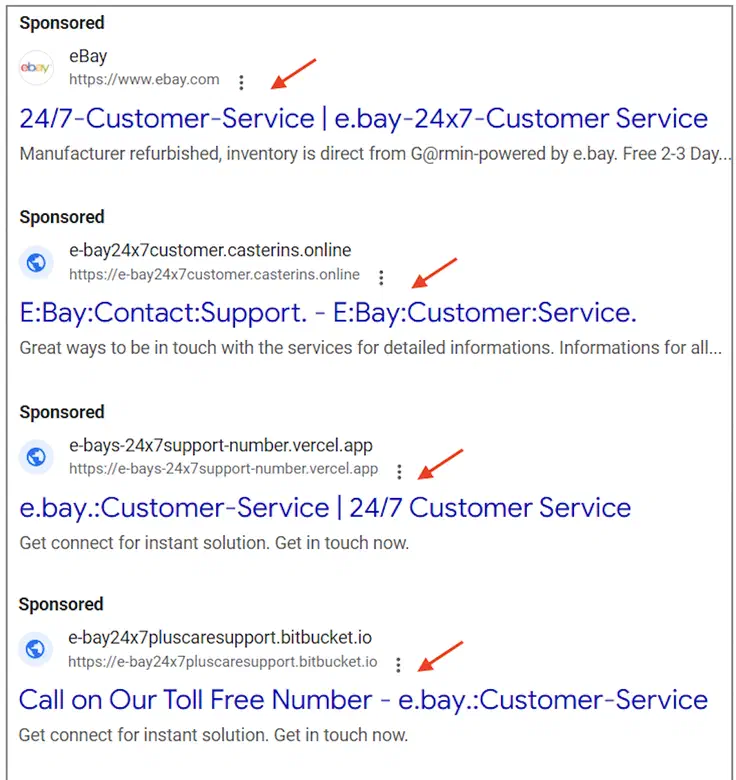
Image credit by Malwarebytes (opens in a new tab)
This tactic bypasses Google’s usual security checks because the displayed URL technically falls under the ebay.com domain. However, clicking the ad takes users to a completely different, fraudulent website. This highlights a loophole in Google’s advertising system that scammers exploit. Once the end user gets directed to the malicious landing page, it displays a search portal with a printed search result that has eBay’s customer service phone number, which is really the scammer’s number, as can be seen below:
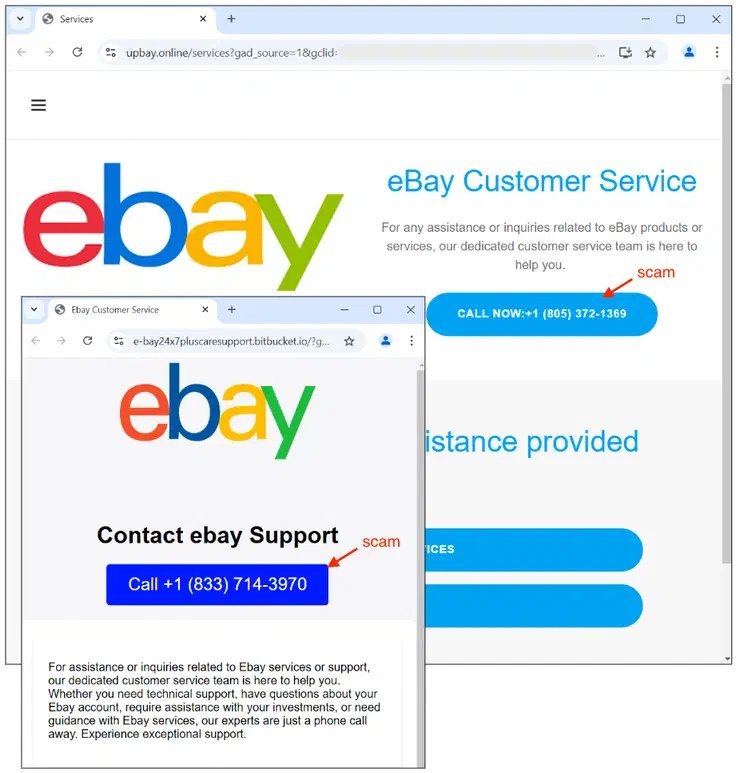
Image credit by Malwarebytes (opens in a new tab)
If large eCommerce platforms are being targeted by Malvertisers and used to spread their malicious ads, then any website can! Make sure to book a call with us to discuss how to protect your ad campaigns from ad tech support scams with our ad security software!
Malicious QuickBooks Popup: How to detect Backdoors threats with ad security software
A new wave of attacks (opens in a new tab), orchestrated by India-based Malvertisers, is targeting QuickBooks end users. Deceptive Google ads are luring victims with fake phone numbers, leading to the installation of malicious Backdoor attacks. Here you will find out about two insidious methods on how Malvertisers exploited ad vulnerabilities in November, all involving Google ads: The first one uses a fake website offering bogus QuickBooks tech support and a fake contact number. The second, more invasive, tricks unsuspecting end users into downloading Malware that generates deceptive pop-up messages with yet another fake phone number.
This scam is perpetrated through a Malvertising campaign via Google Search results promoting a Quickbooks download. Once again, although the URL seems legit and the ad displays the QuickBooks logo, it then leads to a malicious page. The download offered on the page is hosted on Dropbox (A not to be missed red flag, since QuickBooks have their own installers), and once downloaded, it provides two installs: The first one is the genuine QuickBooks software, while the second is a backdoor program named Zeform.exe. The download then triggers an installation error pop-up message. If the end user falls for it they may get in touch with Tech Support (Who are really the scammers) and unknowingly grant them remote access to their devices, potentially leading to Malware infections and data theft.
As we can see, Google continues to be vulnerable to multiple Malvertiser attacks. This is far from being an issue exclusive to possibly the most well-known and used advertising platform worldwide, but it also affects Ad Networks of all sizes, especially starter ones which haven’t yet started investing in ad security infrastructure. However, bad ad quality and security issues can affect any network. so, how to detect Backdoors threats with ad security software effectively to avoid unnecessary trouble? If you are wondering ‘how to protect my website against Malicious QuickBooks Popup?’, it is a good idea to use professional ad safety prevention software such as AdSecure, which will keep your campaigns clean at all times, pre, and post launch with active monitoring, no matter your business size.
How do Malvertisers bypass ad blockers using old school Adware tricks
Most end users these days use ad blockers to appease their concerns about privacy, and to avoid being annoyed by an overwhelming number of ads. A new scam following old tactics (opens in a new tab) has appeared to bypass such software. This is how Malvertisers bypass ad blockers: A campaign launched mainly on media sites contained a malicious ad promising fun and engaging content. Once the end user clicks to access the content, a notification on the site tells them that they need some extra software in order to view the content - A very old trick! Back in the day, these extra elements used to be video players and codecs. With this refreshed version of this scam, the required software is a browser extension that claims to help the end user “continue watching in safe mode.”
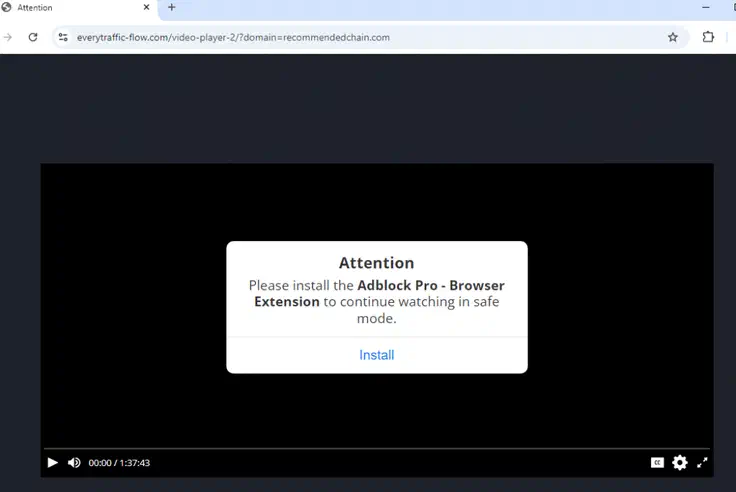
Image credit by Malwarebytes (opens in a new tab)
Upon accepting the notification message, they are prompted to install an ad blocker called Push Notifications Blocker. Installing this bogus blocker quickly brings unwanted consequences, such as a significant decrease in browser performance, as well as sudden and unwanted redirects. Search results will also be compromised, as the extension frequently interferes with the end user’s preferred search engine. Upon further investigation, it has been determined that this extension is classified as Adware. This same deceptive technique, using the same domain, has been used to promote various Chrome extensions that claim to block ads. These extensions have managed to garner significant user trust, highlighting the effectiveness of this misleading tactic. Another unsettling way in which Malvertisers exploited ad vulnerabilities in November 2024.
Cybercriminals use pen testers to test Ransomware efficiency: How to stop Ransomware pen testing attacks on my Ad Network
Threat actors are recruiting pen testers to test and improve the reliability of their Ransomware attacks for Affiliate programs and Advertising campaigns, according to Helpnetsecurity (opens in a new tab). So, if you are looking to reinforce your platform’s security methods, it is a good idea to invest in ad security solutions to stop Ransomware pen testing attacks on your Ad Network.
Penetration testing, or pen testing, is essential to a robust security strategy for companies of all sizes. It involves the controlled and authorized execution of attacks against an organization’s security infrastructure. By simulating real attacks, White Hat hackers can uncover and resolve vulnerabilities before they can be exploited by Malvertisers and bad agents. However, Malvertisers have decided to appropriate this method too, posing as White Hat hackers and tricking testers into infecting their devices with real Ransoware exploits. With this they don’t only claim more victims for their attacks, but they also make sure that their exploits are effective and act accordingly to their schemes before they launch them at a larger scale, across multiple Ad Networks and websites.
This comes to show that cybercriminals are becoming more meticulous in their attacks. They are constantly refining their tactics and improving their tools, to a point where they have started to test their Ransomware on unsuspecting victims before launching large-scale worldwide attacks, thus expanding their malicious influence.
**Conclusion: How to protect my ad campaigns from ad tech support scams and other threats **
According to Infosecurity Magazine (opens in a new tab), less than 1% of ads served globally in 2023 were classed as Malvertising or security attacks. Although this might sound like good news, we need to bear in mind that this still amounts to nearly three billion ad views per year! So, it continues to be extremely important to invest in a competent compliance team as well as great ad security software to keep your ad supply chain and your end users safe from bad ads. Now you know how Malvertisers exploited ad vulnerabilities in November, and really, month after month. Get in touch with our team or why not try AdSecure for free right now! (opens in a new tab)